Last month I wrote a post about how my kids were using the Number Line app to help with rounding - you can check out the post here.
Using an app is always a great way to give kids practice with math concepts, but it does not replace the time they need with concrete, hands-on materials. I really try to stick true to the process of concrete--> pictorial --> abstract. The number line app was pictorial practice for the kids.
I made sure to give them some concrete experiences during our guided math lessons on rounding.
I started my guided math lessons by activating their prior knowledge on rounding. They played a matching game with smaller numbers. They worked together to find all the matches. This got them talking and thinking about rounding.
Next, we spent some time working through a guided practice page together, using a number line in a clear sheet protector and a counter.
We read through the problems together and then used the number line to help us round. The number we were rounding went on top and then we set up our number line, depending on the place we were rounding to. Finally, we placed the counter on the number line to represent where our original number would go.
This was a lot more difficult for some students than I was anticipating. They really struggled to figure out what numbers should go on the number line, and they also had trouble placing the counter. You can see that student had the counter much closer to 15,000 than it should be.
After lots of discussion, we would then slide the counter over to the number it would round to.
Finally, they had to do a few problems on their own for me to check for understanding.
If you're interested in using these ideas in your classroom, you can download my Guided Math Plans for Rounding Whole Numbers - it's available in my Teachers Pay Teachers store
Sunday, November 1, 2015
Tuesday, September 29, 2015
Giving kids choices
One of my favorite ways to keep my students engaged is to give them choice. Sometimes I over think this concept. I try to find small ways to incorporate student choice in our daily activities.
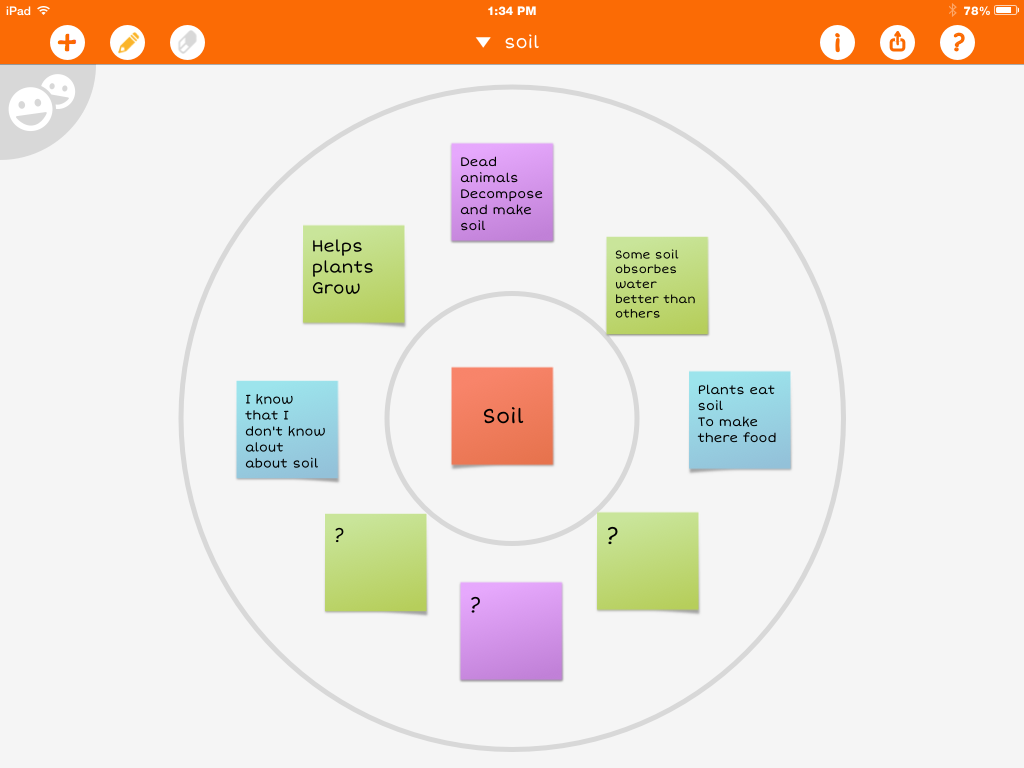
Today in science we started a new unit on soil. I wanted the kids to brainstorm what they already knew about soil. My plan was for students to make a graphic organizer - we use thinking maps at my school. I told them they could make a bubble map or a circle map (2 organizers that include a topic in the middle with facts surrounding it). The kids had a choice of using paper/pencil or any app they had on their ipads. I'm always amazed by how creative the kids can be - I'm also amazed at how different they are!
Here are some samples of what they came up with. You'll notice they're all very different, but they also achieve the same purpose.
I love that each student got to let their personality and unique learning styles show. How do you incorporate student choice into your classroom?
Today in science we started a new unit on soil. I wanted the kids to brainstorm what they already knew about soil. My plan was for students to make a graphic organizer - we use thinking maps at my school. I told them they could make a bubble map or a circle map (2 organizers that include a topic in the middle with facts surrounding it). The kids had a choice of using paper/pencil or any app they had on their ipads. I'm always amazed by how creative the kids can be - I'm also amazed at how different they are!
Here are some samples of what they came up with. You'll notice they're all very different, but they also achieve the same purpose.
I love that each student got to let their personality and unique learning styles show. How do you incorporate student choice into your classroom?
Sunday, September 20, 2015
Digital Number Lines & Rounding
This week my kids are learning to round large numbers. I really want them to understand rounding and not just memorize tricks. In the past I would teach my kids a poem, and while they could round, they didn't really understand why.
Since my classroom is digital, I'm always looking for ways to use our ipads for our math workshop activities.
I found this *free* app called Number Line.
My kids are going to use this app to practice rounding some larger numbers. They'll take screen shots of each number they round and then put them together in pic collage. I made a video to show them how they'll be using the app for the activity.
Check it out:
Here's an example of one of my student's finished products:
How do you teach your kids rounding?
Since my classroom is digital, I'm always looking for ways to use our ipads for our math workshop activities.
I found this *free* app called Number Line.
My kids are going to use this app to practice rounding some larger numbers. They'll take screen shots of each number they round and then put them together in pic collage. I made a video to show them how they'll be using the app for the activity.
Check it out:
Here's an example of one of my student's finished products:
How do you teach your kids rounding?
Sunday, September 13, 2015
Launching Math Workshop, Part 4
Just joining in? Check out the rest of this blog series!
Read on to find out what day 4 of math workshop looks like.
By day 4, I'm just excited that I've made it to the end of the first week! I'm also amazed by how well my kids are doing with math workshop. The structure is very different than what they're used to and there's a lot for them to figure out.
Day 4 is all about creating workshop rules & becoming independent.
Before the kids start working, we create an anchor chart on our math workshop rules. The class helps decide on the rules based on their experiences throughout the week. Of course I forgot to take a picture of our anchor chart...
Our rules focused on working the whole time, using math tools appropriately (tools, not toys), working together (helping, not giving answers), problem solving, and reading the directions (I really try to make a big deal out of this one).
Once we've reviewed the rules and the structure of math workshop, I have the kids hold up a number to show me what box they are on in our blendspace. (Wondering what blendspace is? Check out this post).
Then we spend the rest of the time working on finishing up the activities. Here are a couple of pictures of my kids hard at work.
You can find all of the activities my kids did, including the video, in my Teachers Pay Teachers store.
That ends my week of launching math workshop! Over the next couple of weeks I'll be reinforcing routines with students and helping them understand where and how to turn their work in. By the 3rd week, I'll start pulling my guided math groups.
Tuesday, September 1, 2015
Launching Math Workshop, Part 3
If you missed the first 2 parts of the series, you can check them out here:
Read on to find out what the 3rd day of math workshop looks like.
Day 3 is all about gradually releasing responsibility.
I start off by having the kids talk about what we did the day before in math workshop. Through our discussion, they remember that we use the website blendspace and that they watched a math video.
Wondering what the heck blendspace is? Check out this post
Then I let them know that today they'll be watching the video on their own.
We are using Google Classroom this year, so I shared the link to the blendspace with my classes through that website. So to start off, the kids get onto Google Classroom and we walk through finding the blendspace.
Once everyone has found the instructional video (included in their blendspace), we quickly review our anchor chart on watching videos. Then, they grab their headphones, spread out & get started.
I walk around while they're watching the videos and make sure they're:
1. actually watching it
2. not experiencing any technical difficulties
3. remembering to complete their anchor chart
For today, I have them go back to their desks and read a book when they're finished. Once everyone has finished, we glue our charts in their journals and quickly review how the process went. I was pleased to see how much the kids enjoyed watching the videos.
Then we looked at the directions for the next activity together. I model what the activity will look like and where they will find the math tools. We don't spend a lot of time talking about the rules for workshop yet. That will come tomorrow.
Once everyone understands what they need to do, they spread out again and get started on the activity. The activity they did was using place value blocks to build a number. Then they took pictures of each number and put them into PicCollage. Finally, they added the expanded notation for each number into their collage.
Not everyone finished, but that was okay. I let them know that they will always have 2 days to work on the activities in each blendspace.
Thursday, August 27, 2015
Classroom Scavenger Hunt
It seems like every year in the spring, I still have kids asking me where things are in the classroom. How can they not know where the trashcan is by March?!
I always start off the year by giving a tour of the classroom, but I realize now that they're trying to take in so much information those first few days that they just can't remember it all.
This year is different! This year one of our first week activities was a ...
First I decided on the most important things in the classroom. These are things the kids will use an almost-daily basis. I tried not to pick too many things because I really wanted them to remember where everything was! I also didn't want the activity to take forever...
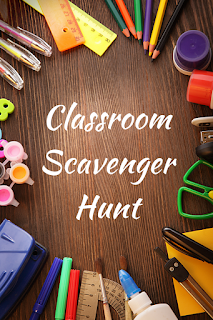
You can see my scavenger hunt below. If you click on the picture, you can download a free copy and edit it to fit your classroom.
I paired my kids up and had them work together to find each item. I didn't make it a competition. This early in the year, I really don't know my kids well enough to know what they can handle. I was a little wary of sending them loose around the classroom in a race : )
I'm very lucky to teach at a school where each student has their own school-issued ipad. We get started using them right away, so I wanted to include a digital aspect to my scavenger hunt. I had the kids take a picture of each item in the scavenger hunt. They put them all together in the free app: Pic Collage Kids. This is an app we'll use all year and most of my kids are already familiar with it. Again, since it's so early in the school year I try to keep things fairly simple.
In my free download on Teachers Pay Teachers, I also included some other digital ideas.
Now when my kids ask me where the trash can is in March, I can kindly redirect them to look at their Pic Collage.
How do you help your kids learn their way around your classroom? Comment below!
I always start off the year by giving a tour of the classroom, but I realize now that they're trying to take in so much information those first few days that they just can't remember it all.
This year is different! This year one of our first week activities was a ...
First I decided on the most important things in the classroom. These are things the kids will use an almost-daily basis. I tried not to pick too many things because I really wanted them to remember where everything was! I also didn't want the activity to take forever...
You can see my scavenger hunt below. If you click on the picture, you can download a free copy and edit it to fit your classroom.
I paired my kids up and had them work together to find each item. I didn't make it a competition. This early in the year, I really don't know my kids well enough to know what they can handle. I was a little wary of sending them loose around the classroom in a race : )
I'm very lucky to teach at a school where each student has their own school-issued ipad. We get started using them right away, so I wanted to include a digital aspect to my scavenger hunt. I had the kids take a picture of each item in the scavenger hunt. They put them all together in the free app: Pic Collage Kids. This is an app we'll use all year and most of my kids are already familiar with it. Again, since it's so early in the school year I try to keep things fairly simple.
In my free download on Teachers Pay Teachers, I also included some other digital ideas.

Now when my kids ask me where the trash can is in March, I can kindly redirect them to look at their Pic Collage.
How do you help your kids learn their way around your classroom? Comment below!
Saturday, August 22, 2015
Launching Math Workshop, Part 2
If you missed part one of this series, be sure to check it out here to find out what I do on the first day of math workshop.
Read on to find out what the 2nd day of math workshop looks like.
For me, day 2 is all about *modeling*.
I start off by briefly explaining to the students what math workshop will look like this year:
- We'll use the website blendspace for their directions
- They'll watch an instructional video for their lesson
- I'll be pulling groups every day
Then we pull up our first blendspace. Since our 1st unit is place value, I introduce workshop with a place value review.
You can find the blendspace here.
Every blendspace will start with a video. I've found my kids focus better watching a short video than they do with the distractions of a whole class mini-lesson. I can also get the information across in a shorter time in a video.
I'll show the video whole class and we'll pause the video and fill out our anchor charts together. (I make a student copy of the anchor chart for each video). I do lots of "think alouds" during the video and make sure the kids really understand what's expected of them while they're watching an instructional video.
After we've all completed our anchor charts & glued them into our journals, we make an anchor chart on watching instructional videos.
Then I have the students think-pair-share what they think they'll be doing for the next activity in the blendspace. They work on the 2nd activity, which incorporates their iPads, on their own. During this time I walk around the room & provide feedback.
Once everyone has finished, we come back together and discuss the next activity in blendspace. Again, they complete it on their own as I walk around the room.
Once they're finished, we come back together and discuss things that went well & things that need to change for the next day.
I tried to choose activities that all students should be able to complete independently, even if they're below level.
You can download all of the materials for these activities here for FREE.
If you like these activities, be on the look out for more digital math stations in my Teachers Pay Teachers store!
Stay tuned for part 3 - gradually releasing responsibility to students!
Subscribe to:
Posts (Atom)