25afbf
Facebook Pinterest Instagram Teachers Pay Teachers Blog Lovin' Image Map
Showing posts with label Hands-On Math. Show all posts

Sunday, February 5, 2017

Hands-On Math: Base Ten Blocks

Hands-On Math is a blog series where I highlight a math manipulative or tool that I use in my 4th grade classroom. The posts will include links to purchase the tools from Amazon. Please be aware that these are affiliate links. I only recommend tools that I have used and loved myself!

What are Base Ten Blocks?
Base Ten Blocks are typically used for place value as they exemplify our base-ten numerical system. However, there are TONS of other ways to use them. Most sets will come with a thousands cube, hundreds flats, tens rods and ones cubes/units

How do I use them in 4th grade?
Big kids still benefit from concrete experiences for math. One way that I have used base ten blocks is to have students build multiplication problems. This comes at the beginning of our lessons on how to multiply two 2-digit numbers together. We use the base ten blocks to model the array model for multiplication. This provides kids with the concrete experience before moving to the pictorial area model and finally to the abstract traditional algorithm. 


We use centimeter grid paper to set up the problem. I got our grid paper from the ETA book that came with the blocks (see link below). First we outline an array to represent our problem. Then starting with a hundreds flat we fill in the array with blocks. Again starting with the hundreds block, we take away a section at a time and write a multiplication sentence for that section. Finally, we add all of the numbers up. 

Ready to try it? 
Get a starter kit from Amazon to use with your small groups. Click the picture below to check it out on Amazon!


Sunday, January 17, 2016

Solving Word Problems in a Digital Classroom

Last year I spent a couple of weeks teaching my kids how to analyze word problems. You can read all about my lessons here .


This year I did the same lessons, with a digital twist. I am really trying to incorporate more digital activities now that I'm in my second year of going 1:1 with students to iPads. 

The first day of our problem solving unit, we created a key words chart. Last year, I had the kids write on a a recording sheet like this:

This year I created the recording sheet in Google Docs and shared it with my student in Google Classroom. In Google Classroom you are able to make a copy of a Google Doc for each student. As we acted out word problems using manipulatives, we added to the Google Doc. The students each added to their own chart - this kept them more engaged than if they watched me create the chart. Now instead of having a copy in their math journals, they have a copy in Google Drive. 

On the second day of the unit, I had students sort word problems by the 4 operations. They had to write a number sentence and an explanation for each problem. Last year it looked like this:

This year instead of using paper/pencil, the kids took pictures of the word problems and put the number sentence and explanation into a pic collage. So now it looked like this:

Now, not everything lends itself to a digital activity. Sometimes I still need my students doing paper/pencil activities. However, when I'm able to make something digital I see an increase in engagement and ownership. The reduction in copies and paper is an added bonus. 

How do you incorporate digital activities into your math block?

Interested in my word problem lesson plans? The first 3 days are available in my Teacher Pay Teacher store:

Sunday, November 1, 2015

Rounding on a Number Line

Last month I wrote a post about how my kids were using the Number Line app to help with rounding - you can check out the post here.

Using an app is always a great way to give kids practice with math concepts, but it does not replace the time they need with concrete, hands-on materials. I really try to stick true to the process of concrete--> pictorial --> abstract. The number line app was pictorial practice for the kids.

I made sure to give them some concrete experiences during our guided math lessons on rounding.

I started my guided math lessons by activating their prior knowledge on rounding. They played a matching game with smaller numbers. They worked together to find all the matches.  This got them talking and thinking about rounding.

Next, we spent some time working through a guided practice page together, using a number line in a clear sheet protector and a counter.

We read through the problems together and then used the number line to help us round. The number we were rounding went on top and then we set up our number line, depending on the place we were rounding to. Finally, we placed the counter on the number line to represent where our original number would go.

This was a lot more difficult for some students than I was anticipating. They really struggled to figure out what numbers should go on the number line, and they also had trouble placing the counter. You can see that student had the counter much closer to 15,000 than it should be.

After lots of discussion, we would then slide the counter over to the number it would round to.

Finally, they had to do a few problems on their own for me to check for understanding.

If you're interested in using these ideas in your classroom, you can download my Guided Math Plans for Rounding Whole Numbers - it's available in my Teachers Pay Teachers store


Sunday, September 20, 2015

Digital Number Lines & Rounding

This week my kids are learning to round large numbers. I really want them to understand rounding and not just memorize tricks. In the past I would teach my kids a poem, and while they could round, they didn't really understand why.

Since my classroom is digital, I'm always looking for ways to use our ipads for our math workshop activities.

I found this *free* app called Number Line.


My kids are going to use this app to practice rounding some larger numbers. They'll take screen shots of each number they round and then put them together in pic collage. I made a video to show them how they'll be using the app for the activity.

Check it out:


Here's an example of one of my student's finished products:


How do you teach your kids rounding?

Sunday, September 13, 2015

Launching Math Workshop, Part 4


Just joining in? Check out the rest of this blog series!

Read on to find out what day 4 of math workshop looks like.

By day 4, I'm just excited that I've made it to the end of the first week! I'm also amazed by how well my kids are doing with math workshop. The structure is very different than what they're used to and there's a lot for them to figure out.

Day 4 is all about creating workshop rules & becoming independent.

Before the kids start working, we create an anchor chart on our math workshop rules. The class helps decide on the rules based on their experiences throughout the week. Of course I forgot to take a picture of our anchor chart...

Our rules focused on working the whole time, using math tools appropriately (tools, not toys), working together (helping, not giving answers), problem solving, and reading the directions (I really try to make a big deal out of this one). 

Once we've reviewed the rules and the structure of math workshop, I have the kids hold up a number to show me what box they are on in our blendspace. (Wondering what blendspace is? Check out this post).

Then we spend the rest of the time working on finishing up the activities. Here are a couple of pictures of my kids hard at work.


You can find all of the activities my kids did, including the video, in my Teachers Pay Teachers store.


That ends my week of launching math workshop! Over the next couple of weeks I'll be reinforcing routines with students and helping them understand where and how to turn their work in. By the 3rd week, I'll start pulling my guided math groups. 

Tuesday, September 1, 2015

Launching Math Workshop, Part 3


If you missed the first 2 parts of the series, you can check them out here:

Read on to find out what the 3rd day of math workshop looks like.

Day 3 is all about gradually releasing responsibility. 

I start off by having the kids talk about what we did the day before in math workshop. Through our discussion, they remember that we use the website blendspace and that they watched a math video. 

Wondering what the heck blendspace is? Check out this post

Then I let them know that today they'll be watching the video on their own. 

We are using Google Classroom this year, so I shared the link to the blendspace with my classes through that website. So to start off, the kids get onto Google Classroom and we walk through finding the blendspace. 

Once everyone has found the instructional video (included in their blendspace), we quickly review our anchor chart on watching videos. Then, they grab their headphones, spread out & get started. 

I walk around while they're watching the videos and make sure they're:
1. actually watching it
2. not experiencing any technical difficulties
3. remembering to complete their anchor chart

For today, I have them go back to their desks and read a book when they're finished. Once everyone has finished, we glue our charts in their journals and quickly review how the process went. I was pleased to see how much the kids enjoyed watching the videos. 


Then we looked at the directions for the next activity together. I model what the activity will look like and where they will find the math tools. We don't spend a lot of time talking about the rules for workshop yet. That will come tomorrow.

Once everyone understands what they need to do, they spread out again and get started on the activity. The activity they did was using place value blocks to build a number. Then they took pictures of each number and put them into PicCollage. Finally, they added the expanded notation for each number into their collage. 


Not everyone finished, but that was okay. I let them know that they will always have 2 days to work on the activities in each blendspace. 

Wednesday, August 5, 2015

Using Manipulatives to Compare Large Numbers

Comparing numbers using manipulatives

I am a firm believe that older kids need manipulatives in math too! Sometimes I think people forget to make math concrete in the upper grades. However, I've found that the older kids still benefit from hands-on learning, just like in the lower grades.

Sometimes it takes a bit of creativity to figure out the best way to use hands-on materials with upper grade math. When I'm teaching my 4th graders to compare and order numbers, the numbers are too big to use place value blocks. So here are some of my favorite things to use:

Use number cards to play a place value game

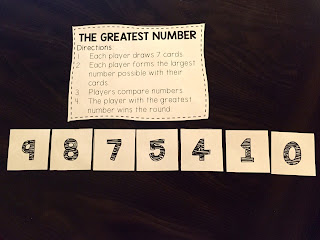
I love to use number cards. This is a game I play with my small groups. Depending on their level, the kids will draw a certain number of cards. (My higher kids will make bigger numbers) Then the kids arrange their cards to make the largest number possible. Then they all compare their numbers. I also use a deck of cards with the face cards removed for this game.

use a place value chart with counters to compare numbers

This strategy is really great for struggling students because it is so visual. I like to put place value charts in sheet protectors {click on the picture to download my FREE place value charts}. Then when we are comparing numbers, we write them in the place value chart with a dry erase marker. This helps the kids line up the numbers correctly. Next I have them place a counter on the digit that helps them compare the two numbers. In this picture, the numbers are the same up until the thousands place. Once we get to the thousands place, we can see that the top number is smaller (the counter is covering up the #8).

Use a small group observation form to keep your notes

When I work with my small groups, I always use a checklist or observation form so I can keep track of my observations. I made an example (with made-up names) to show what they might look like. I've learned that if I don't write it down, I'll forget! It also helps me collect data for our campus intervention meetings.

What are some of your favorite manipulatives to use when you're teaching kids to compare large numbers?

Monday, April 20, 2015

Test prep can be fun!

Testing season can be extremely stressful for both the students and the teachers! This year with our new math standards I felt like there was SO much that I needed to review with my kids.

We spent 3 days playing review games to review some math skills. I tried to focus on the standards that will appear the most on the test (in Texas, we have readiness standards) and on skills that lend themselves well to a game.

I put the kids into mixed ability groups and they rotated through 6 different stations. They did 2 stations each day. I walked around and helped kids/took note of who needed to review with me later.

The kids did a great job with the games! I did give them a warning that if they got in trouble, they'd have to do problems out of the book instead of play the games : )

Station 1:
Multiplication Board Game

You can download it for free here

Station 2:
Decimals Board Game - reviewing addition & subtraction with decimals

Station 3:
Long Division Board Game
Station 4:
Fraction war - I have these cards that have fractions with a picture on them, so the kids like to play war to practice comparing fractions.

Station 5:
Spiral Card Game - I got this great free game from Functional Fun on TPT to help the kids practice converting mixed numbers and improper fractions
You can get it for free here

Station 6:
Computer Station - I rarely let the kids just "play" on the laptops or ipads. We have 3 laptops in the classroom, so the kids used to play some fun games on fractions.
I let them choose from any of the fraction and decimal games on math playground

Such a fun way to review some important skills! How do you help your kids review for testing? Follow my blog with Bloglovin

Sunday, March 22, 2015

Elapsed Time

We spent a couple of days this week on elapsed time - a skill that always proves to be tricky for students. I'm also noticing that my 4th graders aren't as good at telling time as they should be, but they never have to read analog clocks in real life! They get much less practice at telling time than my students used to.

As I've mentioned before in posts about math workshop, I use blendspace to organize the workshop activities for the kids. I also record the lessons and they watch it on their ipad at the beginning of workshop. This really helps with their attention and also gives me more time to pull small groups.

Feel free to check out the blendspace I created on elapsed time here

So their first tasks were to watch the videos. For this skill I made 2 videos, each one teaching a different strategy for elapsed time. Once they were done with the videos, they worked at their own pace through the different activities over the course of 2-3 days.

I had made some QR code task cards and put at a set in each table group's bucket. (Each table has a bucket where I put any supplies they will need for math workshop that day). I also put some clock manipulatives. I am fortunate to have a TON of hands-on math tools at my school, so I had enough for each student to get their own clock.

They solved the problem on the task cards using their clock, used the QR code to check their answer, and then took a picture of the problem and the clock showing the answer. When they were done, they put their pictures into pic collage.

I did this activity in small groups with students who I thought may struggle.


The QR task cards are part of my Elapsed Time Lesson Pack, available in my Teachers Pay Teachers store - check it out here.


After the QR task cards, they did versatiles. I had never heard of these until I came to  my current campus last year and they had a set in each room, but now I love them! Ours are a little out dated, but whenever I find a page that correlates with our current skill, I love to use them. Find out more about them here.


Then I had another set of task cards taped around the room that they answered. Some students were still using their clock to help them, while others were relying more on strategies such as t-charts or number lines. When they finished these task cards, they had to come check in with me before they could move on.

The last 2 activities were intended to be more of an extension - if you got to it, great! If not, no worries. One was to plan your dream day and to outline the schedule. They also had to write down how much time they spent on each activity.

The last activity in the blendspace was to do some practice problems on IXL. Our school doesn't have a membership, but kids can do 20 free problems in a day. I like the repetitiveness of IXL, so I typically include some type of this practice each week.


Saturday, March 21, 2015

Stem-and-Leaf Plots

When we got our new curriculum this year, stem-and-leaf plots were one of the "scary" new additions. I mean, really, who uses a stem-and-leaf plot?! I was a little nervous about finding a meaningful way to teach these to my kids, but as always, the kids did great!

We were able to tie these lessons in with our science unit on the weather. Each table group was given a region of the US. Within the groups, students chose a city and looked up the 10 day weather forecast for that city.

They had to record the weather conditions and the high temperature for each day in the forecast. Then the students in each group combined their data.

They made a dot plot to represent the weather conditions and a stem-and-leaf plot to represent the high temperatures for their region.

It took us a couple of days and lots of mini-lessons and checking in with groups, but they turned out great!


When most of the groups were done with their plots, we worked on writing questions for them. I modeled some questions using the example plots I had made during mini-lessons. I also gave the class some question stems that they needed to include. For example:
How many...
What is the difference between...
How many more _____ than _____

Then each group wrote and answered at least 5 questions for their plots. Some questions went with the dot plot and some with the stem-and-leaf plot. When they were all done we wrote the questions and answers on paper and hung them in the hallway with their plots. I forgot to take a picture of this! I'll have to add it later.

Any other Texas teachers struggling with real-world connections for stem-and-leaf plots?

Sunday, February 8, 2015

Solving Word Problems

This year we changed the pacing of our instruction a little bit. We spent a chunk of time teaching the 4 operations, with heavy emphasis on the skills. Once the students had learned all 4 of the operations, we set aside 2 weeks to focus on problem solving using all of the operations.

In the past we would teach a skill and then look at word problems using that skill. I noticed that I wasn't spending a lot of time explicitly teaching kids how to determine which operation to use. I also realized a lot of kids would catch on to the fact that the word problems were over the skill we were practicing. They didn't have to do a lot of analysis to figure that out.

So this week we spent all week looking at simple word problems. I wanted to spend time explicitly teaching kids strategies to help them solve different types of word problems.

Day 1:
On Monday we looked at example word problems for each operation. We did the same activity 3 different times. First I modeled it whole group, then they worked in small groups of 4, and finally they did it again on their own.

We took 4 problems (1 for each operation) and looked for key words that helped us decide on the operation. We highlighted those words. Then we wrote a sentence explaining how we knew which operation to use. Finally, we wrote a number sentence showing the solution to the problem.


Day 2:
On Tuesday, I wanted the kids to really focus on some of the big concepts for each operation. Looking back, I think it would have been better to flip the activities for Day 1 & Day 2. 

I wrote some simple 1-step word problems for each operation. I passed out different math manipulatives to each table. I displayed one problem at a time and had the students "act out" the problem with the manipulatives. Then we worked together to write a number sentence and discuss what words in the problem helped us know what to do. 


After about 15-20 minutes of acting out different word problems, I collected the manipulatives and passed out a recording sheet. The sheet had 4 sections with an operation symbol at the top of each section. We had a class discussion about the things we noticed for the different operations and recording these observations on the sheet. Some of the big things we talked about were that addition and multiplication give us a larger number and subtraction and division give us a smaller number. We also talked about the fact that multiplication and division have equal groups, while addition and subtraction don't need equal groups. 

Day 3:

 Wednesday, I introduced the kids to a problem solving strategy that I have used in the past. The acronym is CUBES:

Circle the numbers
Underline key words
[Bracket the question]
Eliminate extra info.
Solve the problem 

I explained that this strategy helps them focus in on the important parts of a problem. This will become more important when we start looking at more complex problems. 

Like Monday, we did the same activity 3 different times. I modeled the steps, they worked it out in pairs, and then did it individually. 

I had copied different word problems on a recording sheet. Their first step was to do CUBES to the problem. Then they had to write a number sentence showing how to solve the problem. Once they had the answer, they had to write the answer in a complete sentence (this was harder than you would think!). Finally, they had to justify their answer. We referred back to our chart from Tuesday to help us explain why our answer was reasonable. 


Day 4:

This year our math curriculum specifies that students need to be able to use strip diagrams to represent problems involving the 4 operations. I wanted to spend a day looking at different strip diagrams. The kids had seen these diagrams on our spiral review warm-ups and a lot of them had a difficult time with strip diagrams modeling multiplication or division.

There's a great website and app called Thinking Blocks. We used this to help the kids practice with different diagrams. I don't have a smart board in my room, but we have a "smart pen" that turns the regular board into an interactive board. We used that to practice some different diagrams together.

Then I let the kids spend time in pairs, or independently, playing on the app. We used the addition/subtraction and multiplication/division apps. They were begging for more!


Day 5:

Friday is our assessment day. I gave the kids 8 one-step word problems. They had to use the CUBES problem solving strategy and show their work for each problem. They did a great job! While, I still have some kids who are struggling with the skills, every student knew which operation to do on the different problems. Woohoo!!

Next week we are looking at interpreting remainders and multi-step problems (including problems with extra info.)

Thursday, September 25, 2014

Math Workshop

I am LOVING math workshop this year! I'm doing something totally different than past years and it's been fantastic. We are 1:1 this year with iPads so we're using technology a lot in all of the content areas. I decided to try an in-class flip model for math workshop. We are using the website Blendspace to house all of the workshop activities.

Here's a breakdown of what my math block looks like. I have 60 minutes a day for math.

Challenge Problem

We start off each block with a challenge problem. These are rigorous/multi-step word problems. The kids have 5 minutes to work out the problem with a partner on their white boards. Then we spend about 5 minutes talking about the problem and sharing different strategies for solving it. The kids love doing the challenge problems and it's a great chance to mix in lots of different skills.

Warm-Up

Each week they get a spiral-review sheet to work on. I break the problems down by day. There are 5 problems for each day. Monday is always vocabulary, Tuesday and Wednesday are skill review and Thursday is problem solving. They don't have any problems on Fridays. As we move on throughout the year, Wednesday will become more problem solving practice. I have an extra block of time for math on Tuesdays when my G/T kids are pulled out. I plan on using this time to go over the previous week's warm-up. My G/T kids typically don't need reteaching on these problems, but I can pull them in a small group during workshop for any reteaching they need.

Workshop

Once the kids finish their warm-up problems for the day, they start their workshop activities. We are using Edmodo at our school this year. I post the link to the blendspace in their Edmodo group. They get a new Blendspace on Mondays and Wednesdays and have 2 days to work on the activities.

What's in a Blendspace?

Every Blendspace starts with a video and an anchor chart. I'm a bit of a control freak (aren't all teachers??) so I make the videos myself because I want the kids to hear it the way I'd explain it. I've been using a screen capturing app (Doceri) on my ipad to record the videos. They're pretty basic - it's what I used to do whole class. For each video there's an anchor chart for the kids to fill out. They glue these into their journals. After the video, the kids have different activities to work on. I'm really trying to follow the concrete - pictorial - abstract model. A lot of times the activities are independent, but there are also partner activities mixed in. The kids also know they can help each other during math workshop.

Small Groups

I have 2 groups of kids that I pull every day. These are kids that I know need some extra hands-on practice with me. I pull them as soon as everyone starts working on their warm-up. This way they get a mini-lesson in with me before they watch the video and work on the activities. After I've worked with those 2 groups, I pull kids for reteaching, work on corrections with kids, and help with their workshop activities. I've been amazed at how much more time I have to work with small groups.

Accountability

After kids finish their anchor charts and glue them into their journals, they bring their journals to me to get checked. This helps me check-in with each student before they start the independent activities. It also helps me make sure they're putting their charts into their journals correctly. Before I did this, I discovered a lot of kids weren't gluing their charts into their journals or were leaving the examples blank.

I give the kids a grade for math workshop based on the activities that they complete. Not every kid will complete all of the activities and that is okay! I always put the activities that I consider the most important towards the beginning. If students are working with me, they won't have as much time to work independently. However, they're still getting practice. I give them a check, check plus or check minus on the different activities they complete during workshop. Then I take an average for the week.

Fridays

Friday is my assessment and reteaching day. We still start off with a challenge problem. Then they have a "quick check" to do. It's 5-10 questions over the skills we've been working on that week. I'm able to check these right away and re-teach that day. Friday is also a day for them to finish their warm-up and any unfinished work from the week.

Wow that was a long post!! Now for some pictures : )