25afbf
Facebook Pinterest Instagram Teachers Pay Teachers Blog Lovin' Image Map

Wednesday, August 5, 2015

Using Manipulatives to Compare Large Numbers

Comparing numbers using manipulatives

I am a firm believe that older kids need manipulatives in math too! Sometimes I think people forget to make math concrete in the upper grades. However, I've found that the older kids still benefit from hands-on learning, just like in the lower grades.

Sometimes it takes a bit of creativity to figure out the best way to use hands-on materials with upper grade math. When I'm teaching my 4th graders to compare and order numbers, the numbers are too big to use place value blocks. So here are some of my favorite things to use:
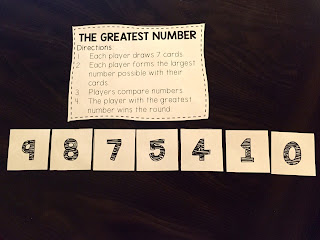
Use number cards to play a place value game

I love to use number cards. This is a game I play with my small groups. Depending on their level, the kids will draw a certain number of cards. (My higher kids will make bigger numbers) Then the kids arrange their cards to make the largest number possible. Then they all compare their numbers. I also use a deck of cards with the face cards removed for this game.

use a place value chart with counters to compare numbers

This strategy is really great for struggling students because it is so visual. I like to put place value charts in sheet protectors {click on the picture to download my FREE place value charts}. Then when we are comparing numbers, we write them in the place value chart with a dry erase marker. This helps the kids line up the numbers correctly. Next I have them place a counter on the digit that helps them compare the two numbers. In this picture, the numbers are the same up until the thousands place. Once we get to the thousands place, we can see that the top number is smaller (the counter is covering up the #8).

Use a small group observation form to keep your notes

When I work with my small groups, I always use a checklist or observation form so I can keep track of my observations. I made an example (with made-up names) to show what they might look like. I've learned that if I don't write it down, I'll forget! It also helps me collect data for our campus intervention meetings.

What are some of your favorite manipulatives to use when you're teaching kids to compare large numbers?

Friday, July 31, 2015

Beliefs to Actions Blog Hop

I've been on a bit of a personal development journey lately. Last January, I read the book Miracle Morning by Hal Elrod and it was really transformational for me personally. I've been thinking a lot about how I could transfer what I learned in the book to my educational life. 

So when I saw this blog hop from Whitney at With Love from Texas, I knew it was meant for me!


I loved reflecting on my educational beliefs. Here's what I came up with: 

So the next challenge was deciding how I would incorporate these beliefs into a daily morning routine at work. So I created my work "miracle morning". 


These are the steps that I plan to go through each morning when I get to my classroom. They're based on the steps described in Hal's book. My beliefs, from above, will be what I read for my one-page teaching affirmations. 

I really think that reflecting on these beliefs daily will help me stay focused on what really matters. I also plan on setting some big picture goals. These will be some more concrete goals related to my classroom (like how I plan to utilize technology and goal setting). 

My daily quote will be something I use with my kids. Each morning I will post an inspirational quote for them to read as part of their morning work. I will read and reflect on it as well during my morning routine. 

My hope is to start the morning off by being intentional and setting a positive tone for my day. 


Continue on with the Beliefs to Actions blog hop by visiting my friend K5 Science Gal (also known as the The Science School Yard) by clicking here!!

Tuesday, July 21, 2015

5 Tips for Using Screencasting in the Classroom


Tips for using screencasting in the classroom

Are you using screencasting in your digital classroom? I use it all the time. Here are my top 5 tips for screencasting in your digital classroom:


There are lots of different apps out there that you can use. My personal favorite is Doceri. There are a lot of fancy things you can do with it, but I mainly use it for the basic screencasting functions. You can check out my youtube video for a tutorial on using the app on your ipad.


Use a screencasting app to create your own instructional videos. You don't have to do a flipped class model to benefit from instructional videos. I record my math lessons using Doceri and the kids watch them at the beginning of math workshop. I can record a 15 minute lesson in about 5 minutes without all their sweet interruptions : ). I've found their attention span is a lot better for the video than a whole class lesson and the kids told me they paid attention to the video better!

Like the idea, but don't want to actually make the videos?? I get it. I've incorporated my videos into digital lessons you purchase. The kids loved my perimeter and area digital lesson, especially the dream bedroom activity at the end! 


When you screencast a lesson, include pictures of your anchor charts. You can use a stylus to write in on the anchor charts. I like to create my "charts" in powerpoint, save them as an image and then put them as the background on my Doceri slides. Then I print off a copy for my students and they fill them in as they watch the videos. 


Another way to use instructional videos is to post them on your class website. This works great as a homework helper for students (and parents love it too!). I've found this especially helpful when my kids are working on a new, complex skill like long division. 


Your students can use screencasting too! My kids love creating their own videos to share with me and other students. It's a great way to get kids explaining their thinking. Check out this *adorable* video one of my kiddos made explaining how to decompose fractions. A bonus is getting to listen to their sweet voices : )

Looking for more ways to go digital? Check out my post on using Google Slides for math workshop!

Here's a fabulous link up hosted by Mrs. Beers, Danielle Knight and The Daring English Teacher for Innovative Classroom Learning Day. Check out the links below to find other blog posts and digital products to check out.


Wednesday, July 15, 2015

Canva Tips & Tricks


I really struggle with designing attractive images, so I've been working really hard to improve in this area. This morning I participated in a webinar put on by Canva. If you're not using that site to create images, I highly suggest you start!

You don't have to be a blogger or Teachers Pay Teachers seller to use it. I played around with creating some motivational prints. You could create your own and have them printed to display in your classroom. The best part is, the site is free. There are some images and features you have to pay for, but you can do A LOT with the free things.

It's fun to play around with their different templates and design ideas. If you looking to go a little bit further, I made a youtube video showing you some of the tips and tricks I learned from the webinar.

Check it out:

I hope this is helpful and inspires you to create!

Tuesday, July 14, 2015

Using Blendpsace in your Classroom

I'm linking up with Techie Turtle for Tech Tip Tuesday!


This post is all about how to use blendspace in your digital classroom!

How to use blendspace in your digital classroom

One of my favorite tech tools in my digital classroom is the website Blendspace. I use this website to organize activities for my kids to complete during math workshop. My favorite things about this website are:

  • It's web based so you can use it with any device.
  • It's visually pleasing.
  • It helps kids stay focused on the tasks by ordering them.
  • You can input a variety of media types.
  • It's free!
I created a youtube video showing how to use the website in your classroom. You can check it out here.

When you create a *Free* account with blendspace, your home screen will look like this:
Using blendspace in your digital classroom

You can browse the gallery for lessons that have already been created.
Using blendspace in your digital classroom

When you find a lesson you like, you can make a copy. You'll be able to edit the lesson, so it's okay if you only like part of it. 
Using blendspace in your digital classroom

Using blendspace in your digital classroom

You can also create original lessons by clicking on "New Lesson" from the home screen. 
Using blendspace in your digital classroom
You can add lots of different things to your blendspace. My favorites are youtube videos, practice problems or games from different websites, google docs with instructions and pictures for foldables or hands-on activities, and quizzes. 

Once you're finished, you click share and you'll have a link that you can send to your students. 
Using blendspace in your digital classroom

Have you used Blendspace in your classroom? If so, I'd love to hear about it in the comments!

Check out my FREEBIE on Teachers Pay Teachers that includes the resources and a link to a blendspace I used in my classroom on Comparing Decimals.

Sunday, July 12, 2015

Vegas!


I had the amazing opportunity to go to the Teachers Pay Teachers Conference in Vegas this year. I'm a fairly new seller with a small store and going to the conference alone was WAY outside my comfort zone. 

I'm linking up with The Elementary Entourage to share my top 5 take aways from the conference. 


Teachers Pay Teachers is made up a team of good people who put education first. I was amazed to find out that every TPT staff member spends several full days a year in classrooms helping teachers. This site is truly about transforming education across the world. Here's my "birthday buddy" Amy from TPT. I found out we share the same birthday!


The successful sellers on TPT work really hard to be successful. I was in awe at how willing they are to pay it forward. This is not a "get rich quick" scheme. The successful sellers are successful because they put long hours in creating high quality products that help teachers. I was excited to meet the infamous Deanna Jump who was incredibly sweet and took the time to meet all the "star-struck" teachers. 


Collaboration is key. Whether you're thinking about it from the perspective of a teacher-author on TPT or as a teacher in the classroom, we really do go further when we work together. I loved meeting teachers from all over the country and swapping ideas. Hearing other teachers' ideas always gets me fired up for my own classroom. 


It's good to get out of your comfort zone. I've been a seller on TPT for less than a year and my store is teeny tiny. I'm an outgoing introvert. I can be outgoing once I get to know you, but putting me in a room full of strangers makes my insides shaky. So how about a room full of 1,000 strangers? Talk about being outside of my comfort zone! It felt really good to conquer that fear and come out on the other side with new friendships and a lot of new knowledge. Here's a picture from the giant blogger meet-up. 


I've had a serious George Clooney crush since the ER days. It's a long running joke with my husband that George is my other dream man. So when I toured Madame Toussaud's with some new TPT friends, I had to share this picture with the hubby. Turns out wax George Clooney is almost as good as the real thing : )

Head on over to Elementary Entourage to check out some other teachers' Vegas experiences. 

Monday, April 20, 2015

Test prep can be fun!

Testing season can be extremely stressful for both the students and the teachers! This year with our new math standards I felt like there was SO much that I needed to review with my kids.

We spent 3 days playing review games to review some math skills. I tried to focus on the standards that will appear the most on the test (in Texas, we have readiness standards) and on skills that lend themselves well to a game.

I put the kids into mixed ability groups and they rotated through 6 different stations. They did 2 stations each day. I walked around and helped kids/took note of who needed to review with me later.

The kids did a great job with the games! I did give them a warning that if they got in trouble, they'd have to do problems out of the book instead of play the games : )

Station 1:
Multiplication Board Game

You can download it for free here

Station 2:
Decimals Board Game - reviewing addition & subtraction with decimals

Station 3:
Long Division Board Game
Station 4:
Fraction war - I have these cards that have fractions with a picture on them, so the kids like to play war to practice comparing fractions.

Station 5:
Spiral Card Game - I got this great free game from Functional Fun on TPT to help the kids practice converting mixed numbers and improper fractions
You can get it for free here

Station 6:
Computer Station - I rarely let the kids just "play" on the laptops or ipads. We have 3 laptops in the classroom, so the kids used to play some fun games on fractions.
I let them choose from any of the fraction and decimal games on math playground

Such a fun way to review some important skills! How do you help your kids review for testing? Follow my blog with Bloglovin